Problem getting Authentication Token

I’m using this link to get the authentication token https://app.hubspot.com/oauth/authorize?client_id=<clientId>&scope=contacts%20content%20reports%20social%20automation%20timeline%20forms%20files%20transactional-email&redirect_uri=https://www.example.com/
and I get this error

[

image.png710x430 14.1 KB

](https://community.hubspot.com/legacyfs/online/uploads/default/original/2X/c/ca69066c73e7ab2370f54583a65908d6a357f5a6.png)

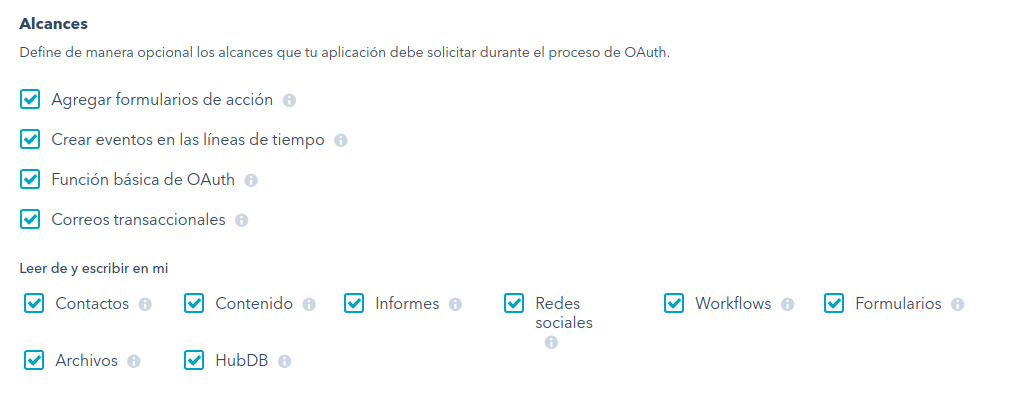
I have all scopes accepted:

[

image.png1011x407 25.1 KB

](https://community.hubspot.com/legacyfs/online/uploads/default/original/2X/7/779d949ad964843a4de75d3f194f387f6839c425.png)

So why I’m getting the error?

@breixocf Can you DM me your Client ID and secret. I’d like to see if I can reproduce this on my end.

@breixocf You were missing the hubdb scope but that didn’t seem to be the entire fix. I can reproduce it on my end.

Can you confirm that the portal you are trying to install into has transactional email and the website add-on? also what edition of HubSpot is it?

[

image.png1046x397 25.1 KB

](https://community.hubspot.com/legacyfs/online/uploads/default/original/2X/4/47564fcf4395e28aa545456ecceb22a858d02a3f.png)

I have everything active.

@breixocf Checking off the boxes doesn’t mean that the portal you are installing the app into has access to automation or hubdb or transactional email.

[

image.png1322x305 20.2 KB

](https://community.hubspot.com/legacyfs/online/uploads/default/original/2X/a/a5c1670d6e8634790d0636671031fb671104346c.png)

I have this accounts, the last is where I will use for test HubSpot integration.

@breixocf You can only install apps into a marketing/sales portal. You cannot install an app into a developer portal.

I use the Developer domain called Enxendra DEV with the Docuten DEMO connection. Sincerely, I don’t know how I could work correctly, and I feel strange about this
frowning.png

No need to feel strange! You need to make a normal portal either in Testing or with a free CRM to test with.

I thought that I did it. How I must do this?

Hi @breixocf,

Here’s some documentation on creating test portals and getting their API key:

developers.hubspot.com

How do I create a test portal?

Test portals can be used to test your integration without affecting your live HubSpot data.

knowledge.hubspot.com

How do I get my HubSpot API key?

Marketing Basic, Professional, and Enterprise customers and portals with a CRM can access the HubSpot API. Learn how to access your HubSpot API key here.

I created a test portal, but when I accessed to that page, it gave me the error
frowning.png
I followed the steps until here
Legacy public apps - HubSpot docs and the Request for integration permissions showed me the error (obviously a different page). I want to do a OAuth integration. Ask me if I must give you more info please.

https://app.hubspot.com/oauth/2300022/authorize?client_id=229cdc01-02c2-4604-bccb-7009053c288a&scope=contacts%20content%20reports%20social%20automation%20timeline%20forms%20files%20hubdb%20transactional-email&redirect_uri=https://www.example.com/

This is the URL that I used. And the page gave me this response

Request for Integration Permissions
Uh oh!
Insufficient scopes were provided. Please contact the integrator.

@breixocf Can you uncheck agregar forumlarios de accion and seeing if that helps?

I created a new application and it worked! In this new app I don’t pick that option… Maybe that fixed the problem, thank you!

I’m glad you have it working! Form actions aren’t really a thing anymore so checking it off without needing it might have caused the issue.

Hello @pmanca @Derek_Gervais!
I have a new answer for you guys. In our company we are using HubSpot for a webpage with JS integration for forms. But now we want to synchronize the data obtained and add some events in Timeline for every contact.

Can I get access token for that app? Can we still have the 2 integrations (JS integration in forms and HTTP requests in code) ?
If you need more info, please contact me

Hope you have a good day
blush.png

@breixocf You can use the access token for that app since you have “Formularios” checked off. You do not need a second app.