Many thanks for your answers @Indra!
Sorry for the late answer, I just came back from holidays.
As you can see, I’ve well advance on this case : Blog | OneStock
Here are some more questions:
A/ Do you know why with search_input module, when I insert a word, the results appeared without the word I search ?
For example, I enter “Ship”, then it’s appear some results as “From Store : les 10 bonnes pratiques” instead of “Ship From Store : les 10 bonnes pratiques”.
B/ I have a blog per language with fr/blog, en/blog, etc.
Can I have results in search input onlu in the language I’m? Here the results are in all languages…
Here is the JS code for A/ and B/
var hsSearch = function(_instance) {
 var TYPEAHEAD_LIMIT = 100;
 var KEYS = {
 TAB: 'Tab',
 ESC: 'Esc', // IE11 & Edge 16 value for Escape
 ESCAPE: 'Escape',
 UP: 'Up', // IE11 & Edge 16 value for Arrow Up
 ARROW_UP: 'ArrowUp',
 DOWN: 'Down', // IE11 & Edge 16 value for Arrow Down
 ARROW_DOWN: 'ArrowDown',
 };
 var searchTerm = '',
 searchForm = _instance,
 searchField = _instance.querySelector('.hs-search-field__input'),
 searchResults = _instance.querySelector('.hs-search-field__suggestions'),
 searchOptions = function() {
 var formParams = [];
 var form = _instance.querySelector('form');
 for (
 var i = 0;
 i < form.querySelectorAll('input[type=hidden]').length;
 i++
 ) {
 var e = form.querySelectorAll('input[type=hidden]')[i];
 if (e.name !== 'limit') {
 formParams.push(
 encodeURIComponent(e.name) + '=' + encodeURIComponent(e.value)
 );
 }
 }
 var queryString = formParams.join('&');
 return queryString;
 };

 var debounce = function(func, wait, immediate) {
 var timeout;
 return function() {
 var context = this,
 args = arguments;
 var later = function() {
 timeout = null;
 if (!immediate) {
 func.apply(context, args);
 }
 };
 var callNow = immediate && !timeout;
 clearTimeout(timeout);
 timeout = setTimeout(later, wait || 200);
 if (callNow) {
 func.apply(context, args);
 }
 };
 },
 emptySearchResults = function() {
 searchResults.innerHTML = '';
 searchField.focus();
 searchForm.classList.remove('hs-search-field--open');
 },
 fillSearchResults = function(response) {
 var items = [];
 items.push(
 "<li id='results-for'>Results for \"" + response.searchTerm + '"</li>'
 );
 response.results.forEach(function(val, index) {
 items.push(
 "<li id='result" +
 index +
 "'><a href='" +
 val.url +
 "'>" +
 val.title +
 '</a></li>'
 );
 });

 emptySearchResults();
 searchResults.innerHTML = items.join('');
 searchForm.classList.add('hs-search-field--open');
 },
 getSearchResults = function() {
 var request = new XMLHttpRequest();
 var requestUrl =
 '/_hcms/search?&term=' +
 encodeURIComponent(searchTerm) +
 '&limit=' +
 encodeURIComponent(TYPEAHEAD_LIMIT) +
 '&autocomplete=true&analytics=true&' +
 searchOptions();

 request.open('GET', requestUrl, true);
 request.onload = function() {
 if (request.status >= 200 && request.status < 400) {
 var data = JSON.parse(request.responseText);
 if (data.total > 0) {
 fillSearchResults(data);
 trapFocus();
 } else {
 emptySearchResults();
 }
 } else {
 console.error('Server reached, error retrieving results.');
 }
 };
 request.onerror = function() {
 console.error('Could not reach the server.');
 };
 request.send();
 },
 trapFocus = function() {
 var tabbable = [];
 tabbable.push(searchField);
 var tabbables = searchResults.getElementsByTagName('A');
 for (var i = 0; i < tabbables.length; i++) {
 tabbable.push(tabbables[i]);
 }
 var firstTabbable = tabbable[0],
 lastTabbable = tabbable[tabbable.length - 1];
 var tabResult = function(e) {
 if (e.target == lastTabbable && !e.shiftKey) {
 e.preventDefault();
 firstTabbable.focus();
 } else if (e.target == firstTabbable && e.shiftKey) {
 e.preventDefault();
 lastTabbable.focus();
 }
 },
 nextResult = function(e) {
 e.preventDefault();
 if (e.target == lastTabbable) {
 firstTabbable.focus();
 } else {
 tabbable.forEach(function(el) {
 if (el == e.target) {
 tabbable[tabbable.indexOf(el) + 1].focus();
 }
 });
 }
 },
 lastResult = function(e) {
 e.preventDefault();
 if (e.target == firstTabbable) {
 lastTabbable.focus();
 } else {
 tabbable.forEach(function(el) {
 if (el == e.target) {
 tabbable[tabbable.indexOf(el) - 1].focus();
 }
 });
 }
 };
 searchForm.addEventListener('keydown', function(e) {
 switch (e.key) {
 case KEYS.TAB:
 tabResult(e);
 break;
 case KEYS.ESC:
 case KEYS.ESCAPE:
 emptySearchResults();
 break;
 case KEYS.UP:
 case KEYS.ARROW_UP:
 lastResult(e);
 break;
 case KEYS.DOWN:
 case KEYS.ARROW_DOWN:
 nextResult(e);
 break;
 }
 });
 },
 isSearchTermPresent = debounce(function() {
 searchTerm = searchField.value;
 if (searchTerm.length > 2) {
 getSearchResults();
 } else if (searchTerm.length == 0) {
 emptySearchResults();
 }
 }, 250),
 init = (function() {
 searchField.addEventListener('input', function(e) {
 if (searchTerm != searchField.value) {
 isSearchTermPresent();
 }
 });
 })();
};

if (
 document.attachEvent
 ? document.readyState === 'complete'
 : document.readyState !== 'loading'
) {
 var searchResults = document.querySelectorAll('.hs-search-field');
 Array.prototype.forEach.call(searchResults, function(el) {
 var hsSearchModule = hsSearch(el);
 });
} else {
 document.addEventListener('DOMContentLoaded', function() {
 var searchResults = document.querySelectorAll('.hs-search-field');
 Array.prototype.forEach.call(searchResults, function(el) {
 var hsSearchModule = hsSearch(el);
 });
 });
}

var input = document.getElementsByClassName('hs-search-field__input')[0];
input.addEventListener('keydown', function(e) {
 if (e.key == 'Enter') {
 e.preventDefault();
 }
});
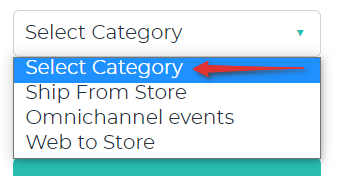
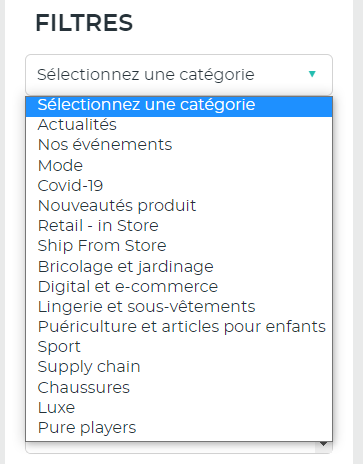
C/ Have you a tips to update css to change this dropdown please? And make it looks like the dropdown I have created for search input.
Many thanks!
Sebastien